Blog · 17 November 2026
Build a YouTube and Instagram content tracker with ChatGPT or Claude
Growing a channel means juggling a plan, a list of video ideas at different stages, a posting rhythm and your numbers. Most people end up with a spreadsheet, three notes apps and a calendar that disagree with each other.
This tutorial builds one app for all of it, from ChatGPT or Claude, without code: a roadmap checklist, a video pipeline, a weekly view, a growth log and an AI assistant. It's based on a tracker we built with a creator, in one chat.

What you need
- ChatGPT or Claude, with Toupas added. It takes one setup.
- A Toupas account. New apps are free for 30 days, with no card.
- Optional: an API key for Claude, OpenAI or Gemini, for the AI part.
You can do all of it on your phone once Toupas is added. More on building from your phone.
Step 1: Describe the tracker
Start with the parts and who can see them:
Make me a private content tracker for my YouTube and Instagram channel,
and put it live with Toupas. Only people I invite can sign in.

Tabs:
- Roadmap: phases (like "Foundation, weeks 1–2"), each with a checklist.
- Pipeline: video ideas that move Idea → Scripted → Recorded → Edited → Posted,
  with format (Short/Reel, long-form, carousel) and platform.
- This week: what I planned to post and what I posted.
- Growth: log my YouTube subscribers and Instagram followers by date, with a chart.

Make it work well on a phone, and installable on my home screen.
Put your own roadmap in, if you have one: paste it as a list. If not, ask the chat to suggest one for your kind of channel.
The chat answers with a link and the access rules: who can see and change what. Read them. For a private tracker, you want "only invited people can sign in" and each person's rows visible to them.
Step 2: Make the roadmap yours
A fixed checklist gets stale. Ask for it to be editable:
Let me edit the roadmap: add, rename, reorder and delete phases and items.
Save the starting roadmap to my data in one step, so nothing is half-copied.
That last line matters more than it looks. Copying 30 starting items one by one can stop partway if the page is closed. Saving them in one step means it's all there, or none of it is and the app can simply try again.
Step 3: Add notes to each item
Checklists hide the thinking. Add a place for it:
Add notes to each roadmap item. Each note has a type: Detail, Decision,
Content, Idea or Link, with its own colour, and an optional link.
Show a count on items that have notes.
Now "Write your channel promise" can hold the five drafts you tried and the one you picked, and why.
Step 4: Add an AI assistant
This is where the tracker starts to pay off. With your own AI key, the app can plan with you, using your roadmap and pipeline as context:
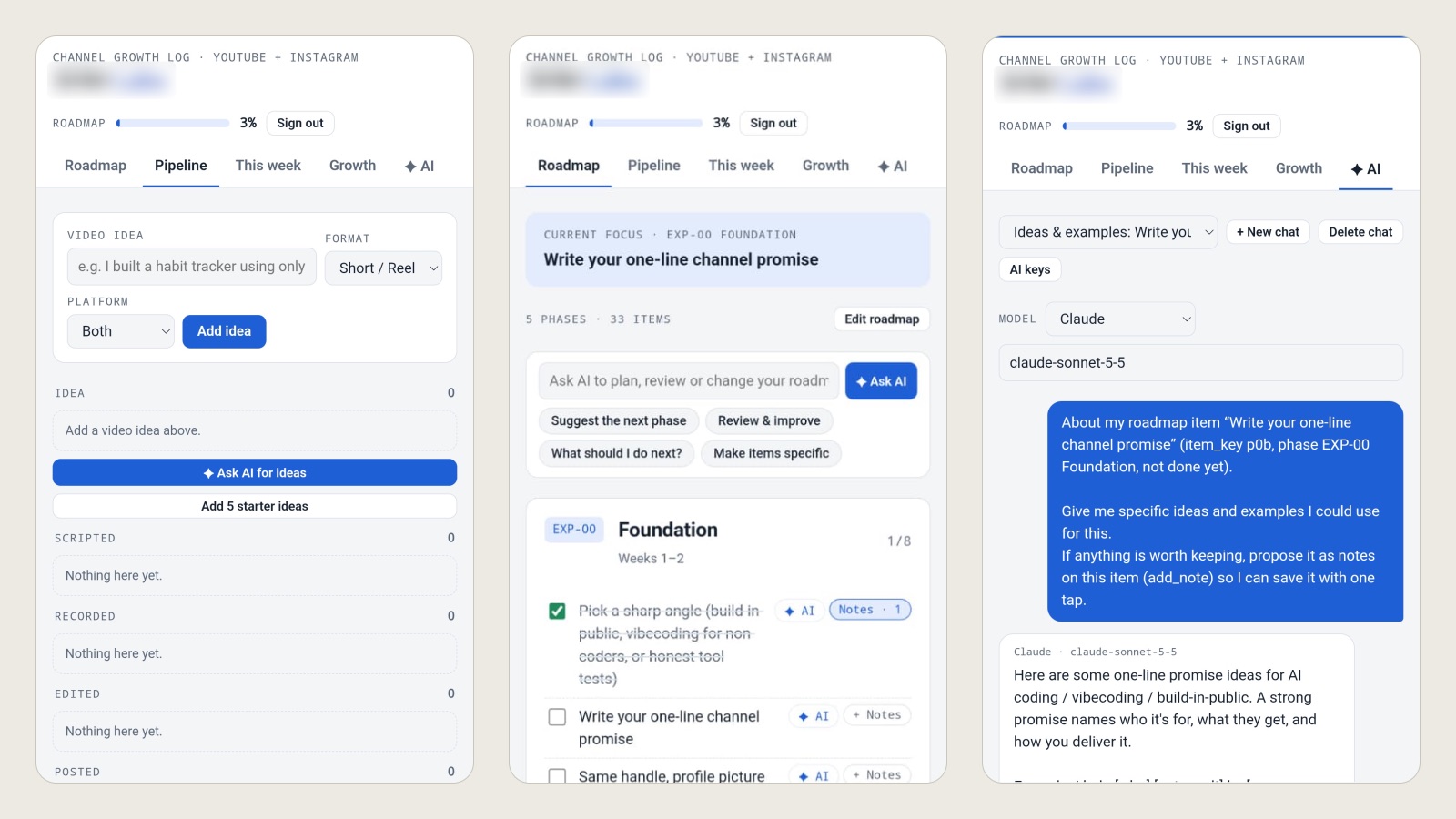
Add an AI assistant with my own Claude key. A chat tab, an Ask AI box on
the roadmap, an AI button on each item ("break into steps", "ideas and
examples"), and "Ask AI for ideas" in the pipeline.
It only proposes changes; I apply them with one tap.
You add the key through a Toupas link, not the chat. The full guide to this step is here.
Step 5: Install it on your phone
Open the link on your phone and add it to your home screen. It opens like an app, full screen. Here's how, and what to ask for.
Using it week to week
- Monday: open This week, check last week's numbers, ask the AI "what should I focus on this week?"
- When an idea hits: add it to the pipeline from your phone in ten seconds.
- After posting: move the card to Posted, add the date and views.
- Monthly: ask the AI to "review my roadmap against my growth numbers".
Changing it later
Open any chat, on any device, and ask: "Add a Sponsors tab to my content tracker." The same app updates and your data stays. Be careful with requests that remove things, like "delete the Growth tab", which can remove saved data; the chat asks you to confirm those.
Questions
Can ChatGPT or Claude make a content calendar app?
Yes. With Toupas added, describe the tabs you want and who can sign in, and you get a live app with saved data, on a link you can open on your phone.
Can I track YouTube and Instagram growth in one app?
Yes. Log subscribers and followers by date in one table, and ask for a chart. The app doesn't read your accounts automatically; you type the numbers in.
Is my content tracker private?
If you ask for invite-only sign-in, only people you invite can open it. The chat that builds it can't see what you save.
Can the AI in my tracker change my plan by itself?
Not if you ask for proposals only. It suggests changes, and nothing is saved until you tap Apply.